Local Clones (Docker Snapshots)
Launching a Clone on Your Local Machine
Baseshift stores your masked, compressed snapshots in an AWS Elastic Container Repository (ECR).
To launch a clone on your local machine, go to the Dub screen:
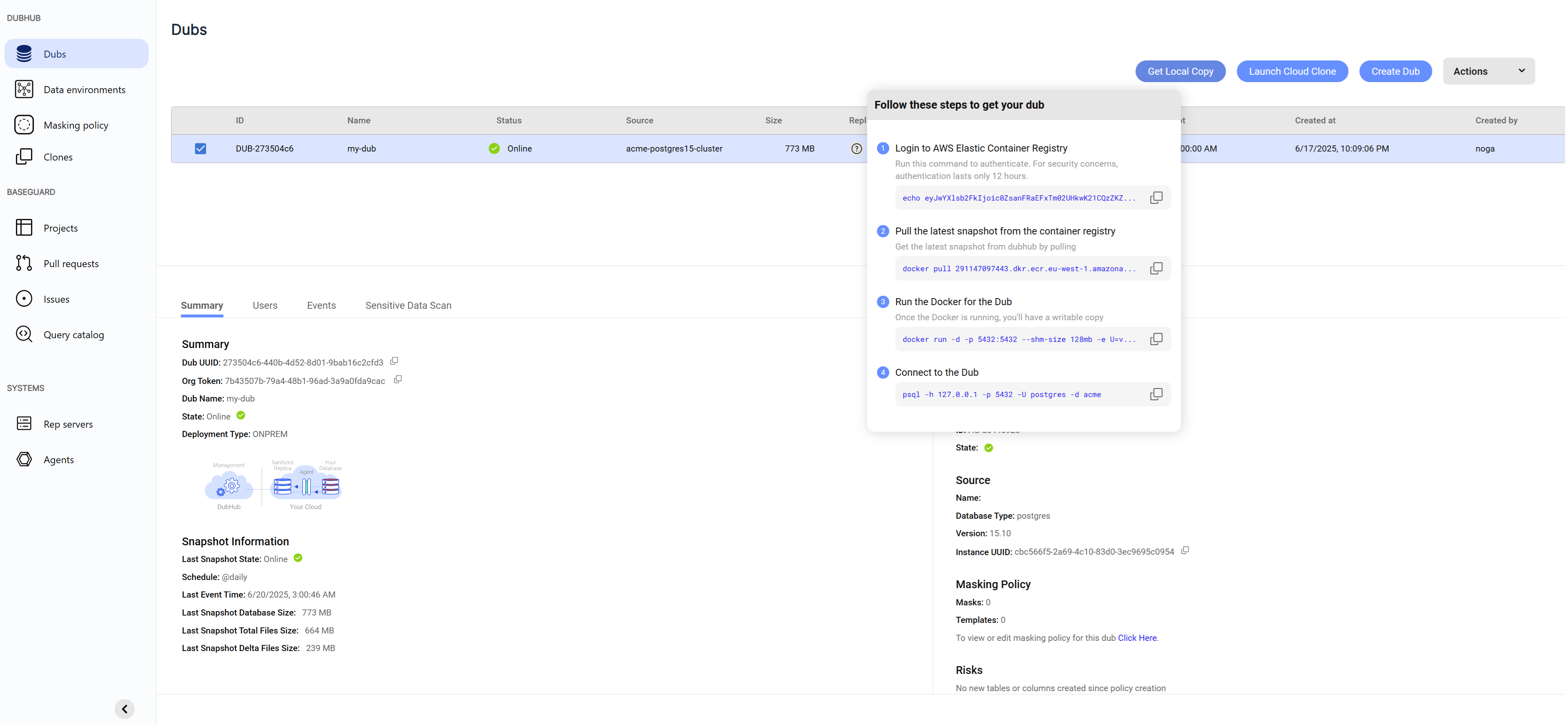
- Select the Dub.
- Click the Get docker snapshot button. This opens a modal with instructions for authenticating to ECR, pulling the image, and running the container.
- Copy and run each instruction in your terminal, one by one.
Note:
- AWS ECR governs access with a security model that mandates authentication every 12 hours. For this reason, you need to first run a command and authenticate against AWS in order to pull your first snapshot, and every 12 hours thereafter.
- If an encryption password was configured when the Dub was created, you’ll need to provide it when running the clone.
- Local clones do not require database user credentials. If you're getting authentication errors, make sure another database isn't already running on the same port.
Running a Clone in a Kubernetes Environment
To run clones inside your Kubernetes environment, use the Helm charts provided by Baseshift.
Advanced Configuration
You can customize the behavior of local clones using environment variables. Here are some of the key advanced options:
-
Backups
Enable automatic backups by setting the following variables:BACKUP_SCHEDULE: A cron-style schedule for when to create backups.BACKUP_DIR: Directory where backups are stored (default:/dubhub/backups).MAX_BACKUPS: Maximum number of backups to retain.
-
Restartable Clones
By default, DubHub clones are ephemeral - each time you launch one, it starts fresh from the snapshot.
To persist changes between restarts, provide a uniqueUUIDvalue when launching the container. -
Storage Monitoring
To prevent abrupt termination due to disk space exhaustion, the clone periodically checks available storage.
It will shut down cleanly when available space falls below 10%.
You can customize this threshold using theSPACE_USAGE_MIN_PERCENTenvironment variable.