Deploy Baseshift Resources
To create a Dub, deploy the Baseshift Connector and Replication Server to your Kubernetes cluster using the provided Helm chart. The wizard generates the Helm installation commands based on the options you select.
The Connector, Replication Server, and clones run inside your Kubernetes cluster. Baseshift does not transfer or store your production data outside your environment.
The following diagram shows the Baseshift components running in your Kubernetes cluster:
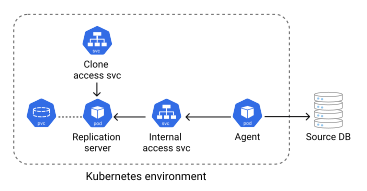
- The Connector is deployed as a Kubernetes Deployment. It subscribes to the source database and streams changes.
- The Replication Server is deployed as a Kubernetes StatefulSet. It creates snapshots, manages the server clones and creates the Docker snapshot images.
- The Clone Access Service exposes the server clones managed by the Replication Server. It can be configured as either an internal Kubernetes Service or an externally accessible Service.
- For a full list of available settings, see the Kubernetes values.yaml reference.
Prerequisites
Before deploying the Baseshift components, ensure that:
Prerequisites
Before deploying the Baseshift Helm chart, ensure that:
- The Kubernetes cluster can connect to the source database.
- The Kubernetes nodes have outbound HTTPS internet access.
- The Kubernetes cluster has sufficient CPU, memory, and storage resources to run the Baseshift components.
- By default, the Replication Server requires 4 vCPUs, 8 GiB of memory, and persistent storage equal to twice the size of the source database snapshot.
- By default, the Connector requires 1 vCPU and 4 GiB of memory.
- These resource requests can be adjusted in the
values.yamlfile. Reducing them may increase snapshot creation time, while larger databases may require higher CPU, memory, or storage allocations.
- Any firewalls, security groups, or Kubernetes network policies allow communication between the cluster and the source database.
- If you plan to generate Docker snapshot images, configure a supported container registry and ensure the Replication Server has permission to push images. For provider-specific requirements, see the Kubernetes values.yaml reference.
Deployment Steps
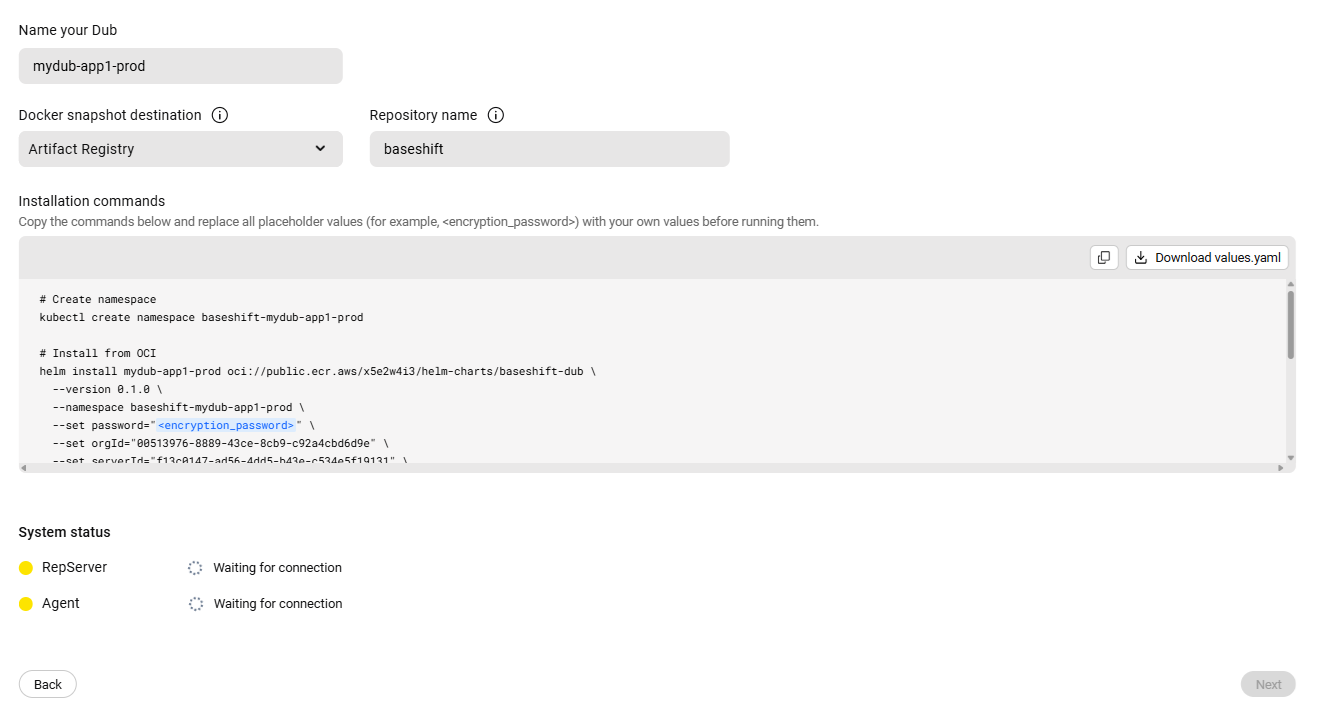
Fill in the required parameters, then copy the generated installation commands or download the values.yaml file.
-
Enter a name for the Dub. This name is used for both the Helm release and the Kubernetes namespace.
-
Select the Docker snapshot registry, or choose None if you don't want to create Docker snapshot images.
-
Choose the authentication method for the selected registry.
-
Copy the generated installation commands or download the
values.yamlfile. -
Replace the placeholders (
<...>) with your environment-specific values:- Set an encryption password. This key encrypts data stored in Docker snapshot images.
- If using Docker snapshots, provide the registry URL and authentication credentials.
- If you want to access server clones from outside the Kubernetes cluster, configure the Clone Access Service in
values.yaml. - Update any other parameters as needed for your environment. For a full list of available settings, see the Kubernetes values.yaml reference.
-
Run the installation commands from a terminal with access to the target Kubernetes cluster.
-
Wait until all Connector and Replication Server pods are in the
Runningstate. -
Once all pods are running, return to Baseshift. The status indicator will change from yellow to green once the Connector and Replication Server have successfully registered.
-
Click Next to continue.