Set Database User
The Dub requires a read-only user that can connect to the source database.
ℹ️ How to create a read-only user
- PostgreSQL
- MySQL
- DocumentDB
--  Replace <password> with your value
CREATE USER dubhub WITH PASSWORD '<password>';
GRANT pg_read_all_data TO dubhub;
--  Replace <password> with your value
CREATE USER 'dubhub'@'%' IDENTIFIED BY '<password>';
GRANT SELECT, REPLICATION SLAVE, REPLICATION CLIENT ON *.* TO 'dubhub'@'%';
FLUSH PRIVILEGES;
--  Replace <database_name> and <password> with your values
use <database_name>;
db.createUser({
  user: "dubhub",
  pwd: "<password>",
  roles: [ { role: "read", db: "<database_name>" } ]
});
At this stage, you’ll see a form like this:
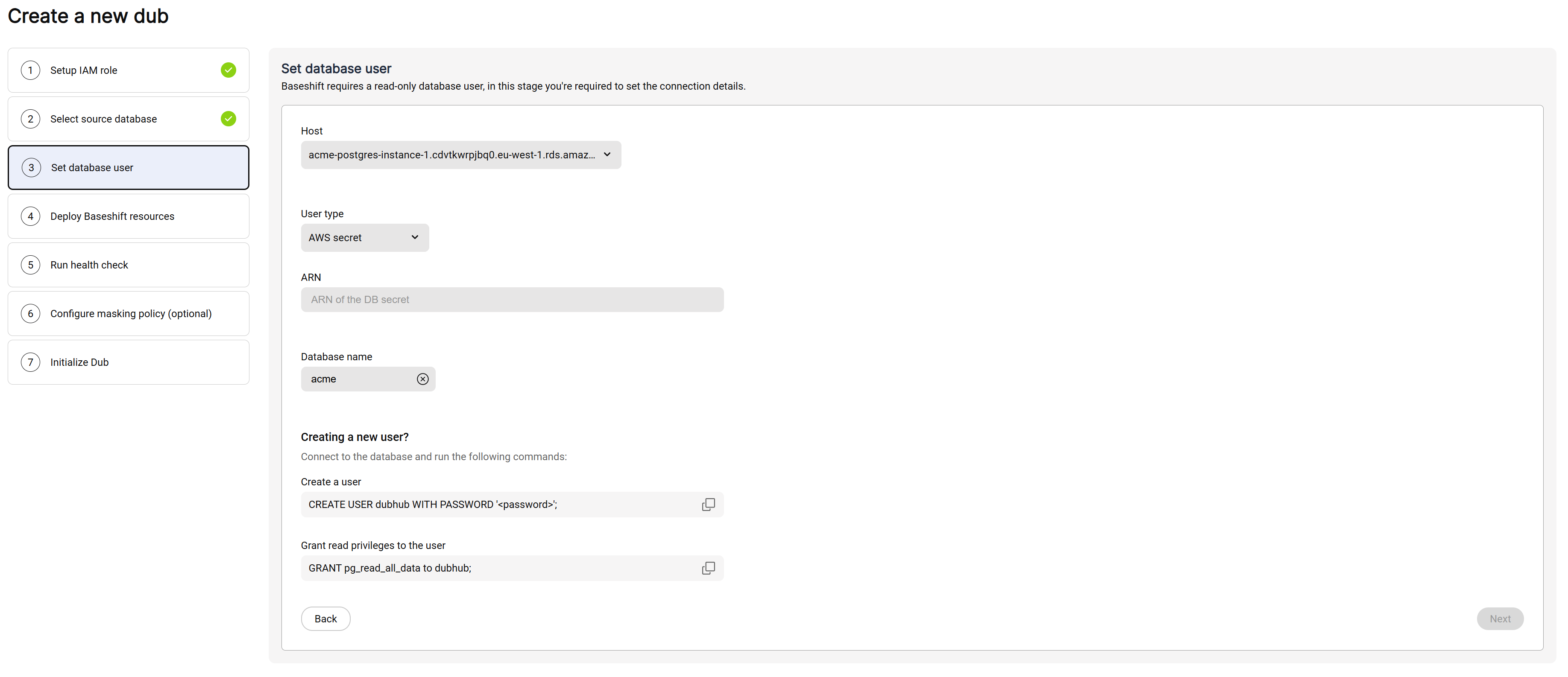
- Select the database instance (host) within the cluster to connect to.
- Under User type, choose how you'd like to provide the credentials:
- AWS Secrets Manager - Enter the ARN of the secret containing the credentials.
- Manual - Enter the username and password directly.
- Click Next to continue.