Deploy Baseshift Resources
To create a Dub, you need to deploy the Baseshift agent and replication server within your network:
- The agent subscribes to the source database to receive transactions.
- The replication server manages the clones.
- Both components are installed on-premises - your data stays within your network.
Installation is done using AWS CloudFormation:
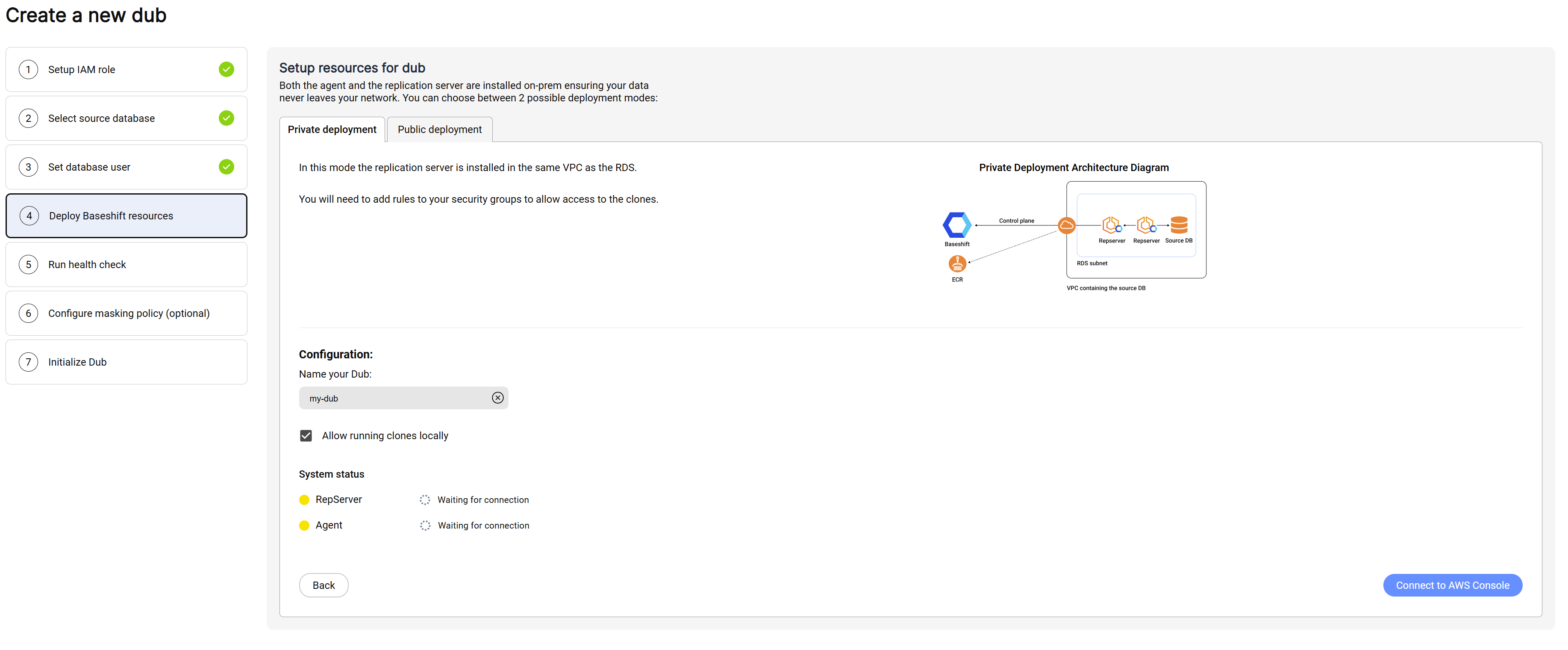
- Enter a name for the Dub.
- If you don't want to create Docker-based clones, uncheck Allow running clones locally.
- Click "Connect to AWS CloudFormation" - a new tab will open in the AWS Console. Review and update the parameters before launching the stack.
Fill out the following parameters according to your setup:
| Parameter | Description |
|---|---|
| Encryption Password | Optional. An additional key used to encrypt data in Docker clones for enhanced security. |
| Server Key Pair | The key pair used to access the replication server EC2 instance. |
| Server Instance Type | The instance type for the replication server EC2. |
| Server Volume Size (GB) | The volume size (in GB) for the replication server EC2. |
The rest of the parameters are prefilled - review and adjust if necessary:
| Parameter | Description |
|---|---|
| VPC of the source database | The VPC where the components will be installed. This must match the source database's VPC. |
| Subnet of the Dubhub Server | A private subnet for the replication server. Must have outbound internet access. |
| Agent Subnet | A private subnet for the agent. Must also have outbound internet access. |
| RDS Security Group | The security group of the source database. The stack creates a new security group for the agent and adds an inbound rule allowing it to connect to the database. |
| Source Database Port | The port number of the source database. Common values: 5432 (PostgreSQL), 3306 (MySQL), 27017 (MongoDB). |
| Database AWS Secret ARN | (Optional) The ARN of the AWS Secrets Manager secret containing database credentials, if provided in stage 2. |
| Server Shared Memory Allocation | Configures the shared memory size allocated to the replication server. |
- Scroll down and check the box labeled "I acknowledge that AWS CloudFormation might create IAM resources with custom names".
- Click on "Create stack".
- After the stack is created, return to Baseshift. The yellow dot will turn green once the agent and replication server are successfully registered.
- Click Next to continue.